
LM Studio Setup Instructions
Download and Install LM Studio
Download and run the installer: Here
Setup LM Studio for use with LrGeniusAI
- Start LM Studio
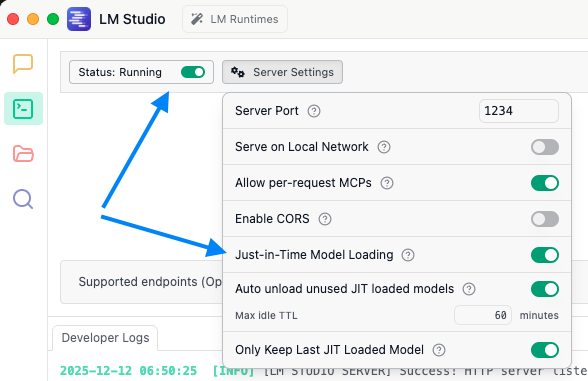
- Go to the Developer Tab
- Set status to: running
- In the Server Settings: Activate Just-In-Time Model Loading
Pull an AI model
Go to the Discover Tab: Search and download the AI model(s) you want to use. Recommended are:
- google/gemma3-4b - Google's open source model
- google/gemma3-12b - Bigger version of Google's open source model‚
- google/gemma3n-e4b - Reduced size (faster) version of gemma3:4b (macOS only, at the moment)
- qwen/qwen3-vl-4b - The current vision model from Alibaba
- qwen/qwen3-vl-8b - Bigger size of qwen3-vl-4b
macOS
If you are running LM Studio on macOS you should models with MLX format. Those models are optimized for Apple Silicon and offer better performance.